
Walk Tracker Pro14.3.3 - App Store
You'll be able to see results in few seconds.
Publisher Description
***** The most advanced walking companion on the app store!
***** Real time customizable audio announcements, accurate calorie calculator, high resolution timer, landscape/arm band, progress charts, ghost runner, interval training plus much more
Whether you are walking for leisure or trying to burn calories, Walk Tracker will track your route and make sure you get to the goals you set.
Seeing your progress over time can be a powerful motivator. That s why Walk Tracker has combined a fully customizable activity planner with training history, calorie graphs, audio feedback and in depth workout plans with targets.
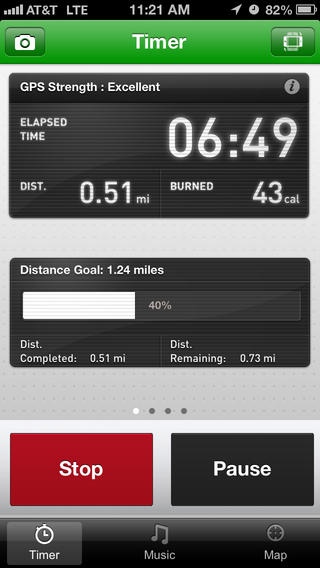
As you exercise you can see your time, pace, speed, calories burned, training intervals, splits, view map in real time, take photos, listen to iPod music and receive audio feedback on your progress.
Get Walk Tracker and enjoy the benefits of a professional virtual walking partner on your iPhone.
EASE OF USE-
Feature packed app with stylish, intuitive, customizable interface.
WORKOUTS-
Choose from a range of workouts
Interval Training
Distance/Time based goal
Race against your previous times
Customize to suit your requirements
CUSTOM READOUTS
Fully customizable, easy to read Dashboard
Timer: Elapsed time, speed, average speed, max speed, distance, calories burned, pace, average pace, max pace
Graph: View graphs of Splits, Pace History and Speed History while you workout
Map: See your position on real time maps from Google
MAPS
Google Maps - Hybrid, Street, Sat
OpenCycle Maps - High Def Cycle Routes
MUSIC
listen to music while you walk
Add a play list from your iPod.
Change your music during your workout
Select a Power song for when you need some extra motivation
GHOST RUNNER
Race against a previous workout, Track your personal bests of routes
Realtime behind/in front readouts
Set the ghost runner to be a 'future better you' with target mode
INTERVAL TRAINING
No training program is complete without interval training, customizable and with audio prompts for change of pace
CAMERA
Take photos during your workout that you can view in Activity History and share
SHARING
Share your activities with your friends
Twitter, Facebook or Email your activity link to the Sprint website
Export your shared route maps to Google Earth
ACTIVITIES
It's not just a professional Walking Partner, Use for Cycling or Running or add your own activity types
MULTIPLE PROFILES
You can set up more than one profile
Each profile can set their own vital statistics and preference for measurement and distance units
ACTIVITY REPORTS
Full History including stats, maps and photos
Distance and Calories burned Reports for each activity type
MANUAL INPUT
Track your indoor walking and running
You can add workout histories manually for activities done without the app
AUDIO FEEDBACK
Get high quality audio feedback, with full customized audio prompts during workout
Prompts are based on distance or time, with the stats you choose
SMALL BATTERY USEAGE
Can track over 6 hours of walking on a single charge on a iPhone 4
Runs smoothly and won t deplete your battery quickly.
Note: Continued use of GPS running in the background can dramatically decrease battery life.
Requires iOS 5.0 or later. Compatible with iPhone, iPad, and iPod touch.
About Walk Tracker Pro
The company that develops Walk Tracker Pro is Bluefin Software, LLC. The latest version released by its developer is 14.3.3.
To install Walk Tracker Pro on your iOS device, just click the green Continue To App button above to start the installation process. The app is listed on our website since 2011-03-22 and was downloaded 0 times. We have already checked if the download link is safe, however for your own protection we recommend that you scan the downloaded app with your antivirus. Your antivirus may detect the Walk Tracker Pro as malware if the download link is broken.
How to install Walk Tracker Pro on your iOS device:
- Click on the Continue To App button on our website. This will redirect you to the App Store.
- Once the Walk Tracker Pro is shown in the iTunes listing of your iOS device, you can start its download and installation. Tap on the GET button to the right of the app to start downloading it.
- If you are not logged-in the iOS appstore app, you'll be prompted for your your Apple ID and/or password.
- After Walk Tracker Pro is downloaded, you'll see an INSTALL button to the right. Tap on it to start the actual installation of the iOS app.
- Once installation is finished you can tap on the OPEN button to start it. Its icon will also be added to your device home screen.
Program Details
System requirements
Download information
Pricing
Version History
version 14.3.3
posted on 2011-03-22
Disclaimer
Official App Store Link
We do not host Walk Tracker Pro on our servers. We did not scan it for viruses, adware, spyware or other type of malware. This app is hosted by Apple and passed their terms and conditions to be listed there. We recommend caution when installing it.
The App Store link for Walk Tracker Pro is provided to you by apps112.com without any warranties, representations or guarantees of any kind, so access it at your own risk.
If you have questions regarding this particular app contact the publisher directly. For questions about the functionalities of apps112.com contact us.
